

Phonto
For Android
Screenshot

Apps Introduction
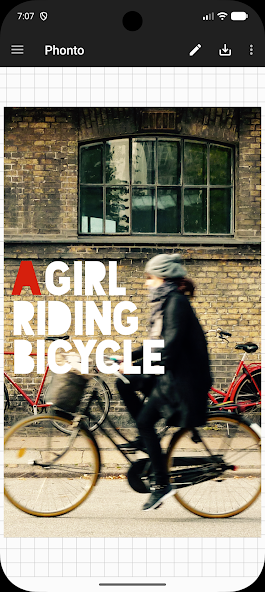
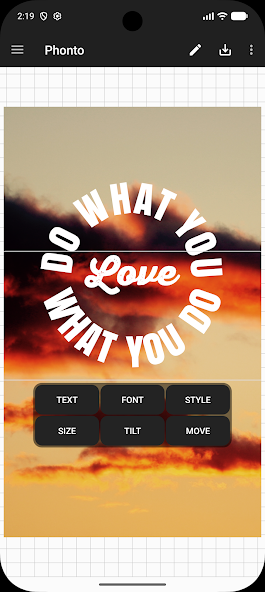
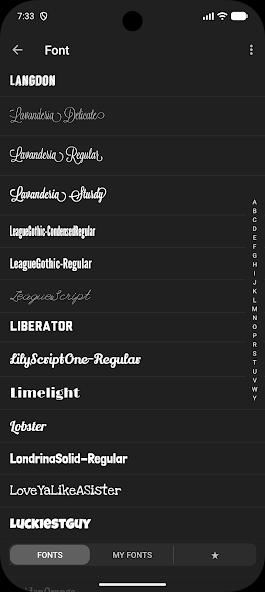
Phonto is a versatile Android application designed to enhance your photo editing experience by allowing you to add text with flair and creativity. Developed with a primary focus on text customization, Phonto's standout characteristic is its extensive library of over 200 font styles and the ability to install additional fonts. Users can expect a highly customizable interface, offering easy-to-use tools for modifying text size, color, shadow, rotation, and even blending modes. With Phonto, Android users can turn ordinary photos into captivating visuals adorned with personalized text effects.
Customizable Text Options and Font Selection
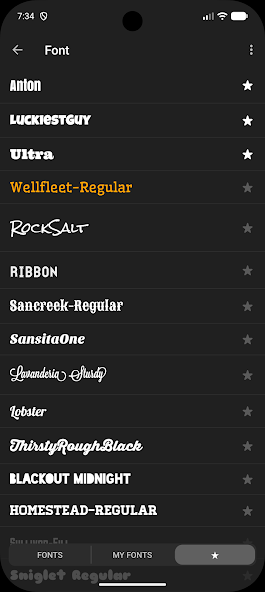
At the core of Phonto's functionality is its wide array of text customization options. The app provides users with the ability to change font size, color, and shadow, allowing for precise personalization of text overlays. Additionally, users can adjust text's stroke color and width, background color, letter spacing, and line spacing to achieve the desired effect. Phonto also supports over 200 built-in fonts, and for those looking to expand their creative toolbox, it offers the option to install external fonts, opening up limitless typography possibilities.
User-Friendly Interface
One of Phonto’s key strengths is its user-friendly interface, which makes the process of text editing intuitive and straightforward. Users can easily navigate its features and apply modifications without a steep learning curve. The app’s design caters to everyone from casual users wanting quick edits to professionals seeking advanced customization, ensuring a seamless experience for all.
Ad-Free Experience
For users who prefer an uninterrupted experience, Phonto comes with an ad-free option. By upgrading through the app’s settings, users can enjoy all of Phonto's powerful features without the distraction of advertisements. This makes it even more appealing to those who want to focus solely on their creative process.
Simple Download and Installation Process
Downloading and installing Phonto on your Android device is a simple and easy process. Users can obtain the APK or MOD version from trusted platforms such as Apkmody, where they can download the app without needing Google Play access. After downloading, enabling "Unknown Sources" on the device allows for quick installation, and within moments, users can start enhancing their photos with creative text.
Enhance Your Photos with Phonto Today
Phonto serves as an ideal application for those looking to add a personalized touch to their images through customizable text options. Its extensive font selection, intuitive interface, and ad-free feature make it an attractive tool for both casual users and professional photo editors. Whether you are editing for social media or personal projects, Phonto’s capabilities offer you endless creative possibilities. Explore more about the app’s download options and see how it can transform your photo editing experience on Android today.
Apps Information
-
Size
24.15M
-
Language
English
-
Developer
youthhr
-
Version
v1.7.143
-
Updated
11 20, 2026
-
Package
com.youthhr.phonto
-
Category
System Tools
Related Topics
More- Best Tools Apps

11 18, 2026Update
Get the best Android utility apps in 2026. Download free tools for file management, phone cleaning, security, system optimization, and everyday productivity.





Related News
More


You Might Also Like
Change


Similar Apps
More-
View
 Ad Blocker
8.92M
-
View
 NowAI
107.52M
-
View
 AI Chat Ask AI Chat Anything
64.79M
-
View
 iTranslate
212.46M
-
View
 RecCloud
77.31M
-
View
 Frequency Generator
4.36M
-
View
 FocusX
23.37M
-
View
 Captions Ai
67.03M
Featured Topics
More


Popular Apps
More
Question
- Download failed
- Outdated Resources
- Resource Error
- Viral Applications
- Pornography
- Gambling
- Political Unrest
- Fraud
- Infringement
- Other
Description
Tel
Report or Correction