

Music
For Android
Screenshot


Apps Introduction
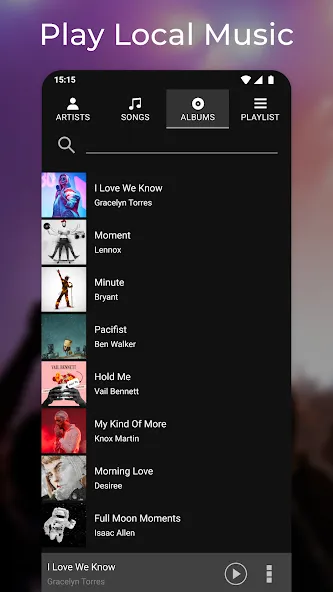
The Music APK is a versatile Android application designed to play music files stored directly on your device. As an offline music player, its primary goal is to offer you the freedom to enjoy your favorite songs without the need for an internet connection. With Music APK, users can browse through their stored tracks by song, artist, album, or folder, making it easy to curate playlists and control playback preferences. Expect an intuitive interface that caters to your music-listening habits, whether you're at home, on the move, or exercising.
Efficient Music Library Management
Music APK stands out for its ability to help users manage their music libraries effectively. You can navigate your collection in various ways, such as by artist or album, which grants you flexibility in how you choose your listening experience. This is particularly useful if you have a large library, as it allows you to find songs quickly without endless scrolling.
Customizable Playback Options
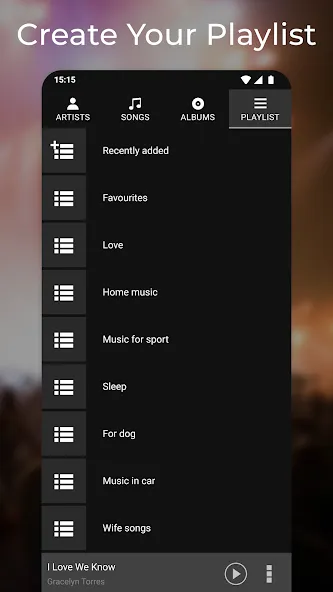
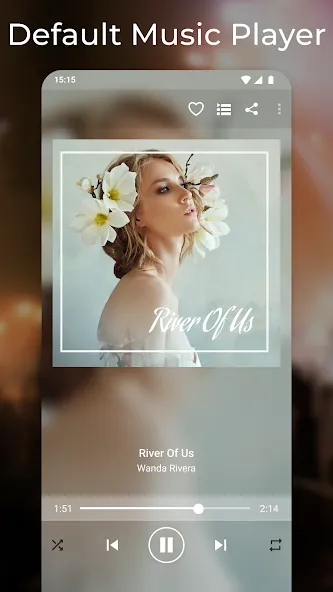
This application goes beyond merely playing tracks; it allows you to tailor your music playback to your preferences. You can create playlists for different activities or moods, shuffle or repeat songs as desired, and even adjust the playback speed. These functionalities make it ideal for users who want a personalized listening experience. Additionally, gapless playback ensures that consecutive tracks flow seamlessly, enhancing album sessions.
Comprehensive Control and Accessibility
Music APK offers varied control options, whether through the device interface, a widget, or supported headphone buttons. It provides the convenience of managing playback without needing to unlock your device or open the app, extremely handy for on-the-go usage.
Offline Playback and Device Compatibility
Designed specifically for offline use, Music APK accesses audio files stored locally on your device or SD card. This offline attribute makes it an excellent choice for users with limited internet access, ensuring that your music is available wherever you go. However, note that the app contains ads and offers in-app purchases to unlock additional features.
Download and Installation Guide
To install the Music Mod APK version 1.4.3, ensure that your device is set to accept installations from unknown sources. Download the APK file and save it to your device's download folder. After this, initiate the installation by selecting the file and proceed with the on-screen instructions. Once the installation is complete, you can start using the app immediately.
Conclusion: Enhance Your Music Experience
Music APK provides a user-friendly platform for Android users to enjoy their saved music offline. Its customizable features and intuitive interface make it an appealing choice for music enthusiasts who want to manage their playlists and playback seamlessly. Music APK is worth exploring for those interested in a reliable offline player that emphasizes user control and convenience. You can find the latest download options on platforms like ApkMody.
Apps Information
-
Size
42.28M
-
Language
English
-
Developer
JRT Studio Music Players
-
Version
v1.4.6.4
-
Updated
11 23, 2026
-
Package
music.musicplayer.blue
-
Category
Video & Audio
Related News
More


You Might Also Like
Change





Similar Apps
More-
View
 Music AI
99.04M
-
View
 Tubio
58.29M
-
View
 Music Player
30.71M
-
View
 Movie maker
88.37M
-
View
 BIGVU Teleprompter
188.05M
-
View
 Video Downloader
42.49M
-
View
 VITA
236.39M
-
View
 Classical Radio
12.69M
Featured Topics
More


Popular Apps
More







Question
- Download failed
- Outdated Resources
- Resource Error
- Viral Applications
- Pornography
- Gambling
- Political Unrest
- Fraud
- Infringement
- Other
Description
Tel
Report or Correction