

Game Mode
For Android
Screenshot
Apps Introduction
Game Mode is an innovative Android application designed to enhance your mobile gaming experience. By offering a plethora of features that cater specifically to gamers, such as screen recording, brightness/volume controls, and performance statistics, Game Mode aims to solve common smartphone gaming issues. Ideal for Android users who seek to optimize their gaming sessions, this app acts as a perfect companion by transforming your device into a dedicated gaming hub. Whether you're a casual gamer or an aspiring streamer, Game Mode equips your smartphone with the tools needed for seamless and efficient gameplay.
Maximize Gaming Performance
Game Mode's capability to act as a task manager for your device elevates the effectiveness of your gaming experience. It provides real-time performance metrics and device statistics, allowing users to manage memory and optimize device potential with just one tap. For avid gamers who deal with high-intensity Android games, this function is crucial to minimizing lag and maintaining smooth gameplay.
Comprehensive Screen Recording and Visual Controls
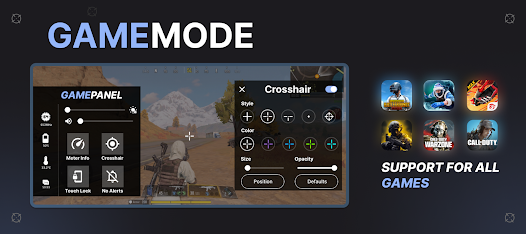
For those interested in game streaming, Game Mode includes sophisticated screen recording and screenshot tools. With a screen overlay interface, you can conveniently record high frame-rate videos of your gameplay, ideal for sharing on platforms like YouTube. Additionally, Game Mode offers customizable brightness and volume controls to adapt quickly to varying lighting conditions during gaming, ensuring an enhanced visual experience.
Customizable Game Launcher
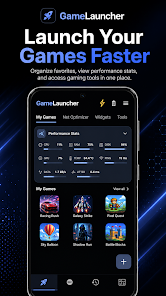
Game Mode also serves as a personalized game launcher, allowing users to organize and access their game library efficiently. Similar to stock launchers provided by certain Android UIs but more versatile, it offers a singular space for your games alongside additional features designed for enhanced gaming modes.
Enhanced Shooting Game Experience
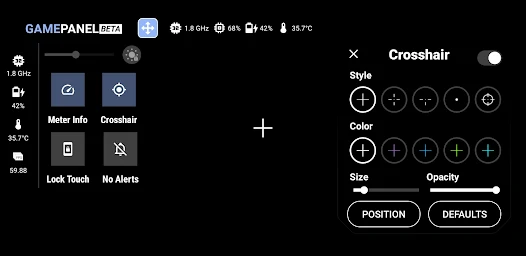
For fans of first- and third-person shooter games, Game Mode offers features like crosshair overlay and control locks. These functions are essential for games like PUBG Mobile and Call of Duty Mobile, helping you improve your aim and mastering control layouts, thereby improving your chances of achieving higher ranks in competitive play.
Optimized Network Management
One of the standout features of Game Mode is its Network Optimizer, which manages bandwidth consumption for a seamless online multiplayer experience. By maintaining stable ping times, this tool ensures consistent frame rates, enhancing gaming sessions with friends without interruption.
Conclusion: Take Your Gaming to the Next Level
Game Mode is the ideal solution for Android gamers looking to augment their mobile gaming setups. With capabilities ranging from performance management to advanced screen control, it offers essential tools to enhance any gaming experience. Perfect for both casual players and professional streamers, it ensures distraction-free gaming with its ad-free interface. For those interested in this powerhouse of a gaming application, exploring the download options available will unlock a new horizon in Android gaming.
Apps Information
-
Size
18.24M
-
Language
English
-
Developer
devayu labs.
-
Version
v0.1.0-rc337
-
Updated
11 23, 2026
-
Package
com.devayulabs.gamemode
-
Category
Photo Enhancement
Related Topics
More- Best Tools Apps

11 18, 2026Update
Get the best Android utility apps in 2026. Download free tools for file management, phone cleaning, security, system optimization, and everyday productivity.





Related News
More


You Might Also Like
Change















Question
- Download failed
- Outdated Resources
- Resource Error
- Viral Applications
- Pornography
- Gambling
- Political Unrest
- Fraud
- Infringement
- Other
Description
Tel
Report or Correction