
Folder Widget
For Android
Screenshot
Apps Introduction
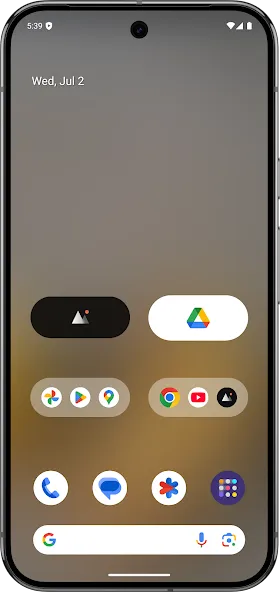
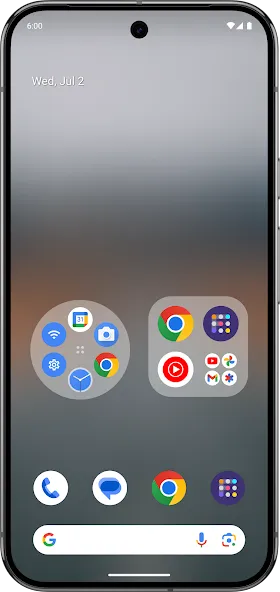
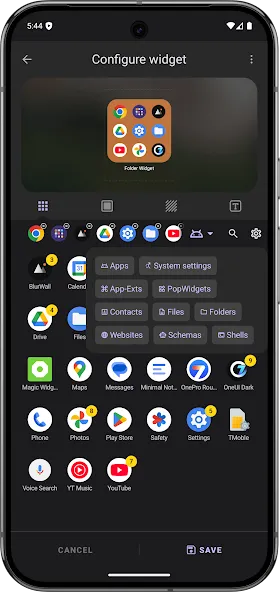
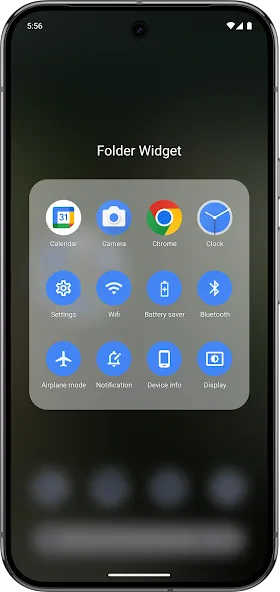
Folder Widget is an innovative Android application designed to enhance the organization and accessibility of your smartphone's home screen. With Folder Widget, users can consolidate apps into large, easily navigable folders, making it simple to access apps without opening individual folders first. This tool offers a practical solution for users seeking streamlined navigation and quick access to essential apps, standing out for its rich customization options that appeal to those who value personalization and efficiency on their Android devices.
Powerful Organizational Features
The core function of Folder Widget is its ability to organize apps into large folders or icons on the home screen. Users can set up these folders to quickly access apps with a simple tap on the folder's corner, enhancing the user experience by minimizing the time spent searching for individual apps. This functionality is ideal for users who manage numerous applications and want to maintain a clean and efficient interface.
Customization and Flexibility
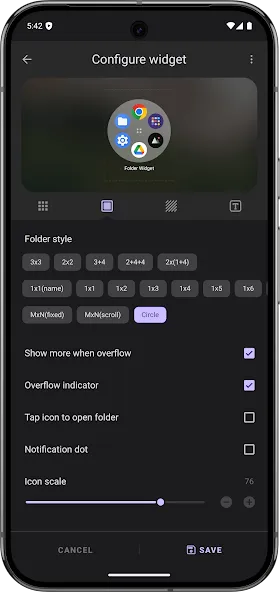
- Customize widget sizes and styles: Folder Widget offers a variety of structures like 2x2, 3x3, and circular configurations to fit different user preferences. Moreover, you can adjust background colors, corner radius, and paddings for a personalized look.
- Advanced shortcut options: The app supports multiple shortcuts, including system settings, app internals, files, folders, and even web pages, ensuring that users can tailor their home screen shortcuts to their specific needs.
Enhanced User Experience
Folder Widget improves user interaction with several features, including adaptive icon shapes, icon packs, and automatic dark folder backgrounds. Users can even add pop-up widgets to icons, providing additional layers of functionality directly from the home screen.
Accessibility Features
Designed with accessibility in mind, Folder Widget includes shortcuts for actions like returning to the home screen, opening recent apps, and taking screenshots on newer Android versions. These enhancements cater to users who appreciate quick and easy navigation across their devices.
Conclusion: Streamline Your Android Experience
Folder Widget is perfect for Android users who desire a more organized, efficient, and personalized device interface. With its robust customization options and intuitive design, it not only enhances productivity but also ensures that users can access their favorite tools and apps with minimal effort. For those interested in optimizing their Android device, consider downloading Folder Widget from a reliable APK source like Apkmody.
Apps Information
-
Size
21.96M
-
Language
English
-
Developer
automan
-
Version
v11.0.6
-
Updated
11 23, 2026
-
Package
pub.hanks.appfolderwidget
-
Category
Theme Wallpapers
Related Topics
More- Best Tools Apps

11 18, 2026Update
Get the best Android utility apps in 2026. Download free tools for file management, phone cleaning, security, system optimization, and everyday productivity.




Related News
More


You Might Also Like
Change





Similar Apps
More-
View
 Sticker Maker
20.04M
-
View
 Spheroid
128.32M
-
View
 Launcher OS
130.01M
-
View
 Facemoji Keyboard
57.92M
-
View
 MagPic - Photo Editor Pro
23.95M
-
View
 Wallfever
7.31M
-
View
 Windy com
45.97M
-
View
 Bluric
25.94M
Featured Topics
More


Popular Apps
More


Question
- Download failed
- Outdated Resources
- Resource Error
- Viral Applications
- Pornography
- Gambling
- Political Unrest
- Fraud
- Infringement
- Other
Description
Tel
Report or Correction