

Shizuku
For Android
Screenshot
Apps Introduction
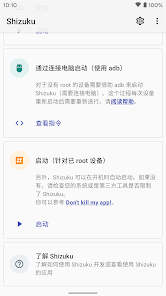
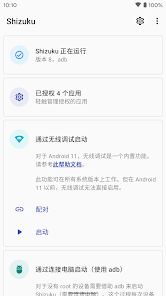
In the ever-evolving world of Android, Shizuku emerges as a game-changing application that grants users unprecedented control over their devices. Offering a suite of advanced customization tools without the need for root access, Shizuku allows users to manage apps, access detailed settings, and even remove pre-installed software efficiently. What sets Shizuku apart is its ability to perform these functions through seamless wireless debugging, providing a smoother user experience while maintaining device stability and security. With its comprehensive capabilities, Shizuku is an essential tool for both tech enthusiasts and everyday smartphone users seeking optimization and enhanced performance.
Unveiling Shizuku's Main Features
Shizuku stands out with its impeccable wireless debugging capability. Users can effortlessly control applications and permissions directly via Wi-Fi or Bluetooth, bypassing the need for a computer or root access. This feature simplifies debugging, making it fast and straightforward, thus enhancing system-level functionality management. Additionally, Shizuku empowers users with advanced application control, allowing them to edit hidden folders, manage idle apps, and uninstall unnecessary pre-installed software. This comprehensive control ensures that Android devices operate smoothly without compromising security or stability.
Performance Optimization at Its Best
Performance is a critical aspect where Shizuku excels. The application helps in speeding up devices by cleaning background processes and freeing up storage space. This leads to faster operation, longer battery life, and overall improved device performance. Users seeking professional-grade Android optimization can pair Shizuku with tools like Canta Debloater for optimal results.
Intuitive Permission Management
Shizuku offers an in-depth permission management system, making it easy to control, limit, or grant application permissions. This not only ensures that apps function as expected but also enhances device security and performance. The application's intuitive interface is designed to guide even novice users through the installation process effortlessly, ensuring a reliable and pleasant user experience.
Compatibility and Integration
Shizuku's compatibility extends across various Android platforms, including MIUI, and integrates seamlessly with other powerful applications like Ice Box and Netwall. Its simple interface with automatic setup features provides powerful functionalities quickly, making it a versatile tool on any Android device.
Conclusion: Discover Shizuku for Enhanced Android Experience
For Android users looking to maximize device control and performance, Shizuku offers a compelling suite of tools and features. Whether it's for casual users wanting a smoother smartphone experience or tech-savvy individuals requiring detailed system management, Shizuku is a valuable asset. Explore the possibilities with Shizuku on the Android download platform and discover how it can transform your device into a more intelligent, efficient, and personalized digital companion.
Apps Information
-
Size
2.48M
-
Language
English
-
Developer
Xingchen & Rikka.
-
Version
v13.6.0.r1091.b844bc49
-
Updated
11 26, 2026
-
Package
moe.shizuku.privileged.api
-
Category
System Tools
Related Topics
More- Best Tools Apps

11 18, 2026Update
Get the best Android utility apps in 2026. Download free tools for file management, phone cleaning, security, system optimization, and everyday productivity.
-
View
 Level SuperMind
Lifestyle Services / 95.67MB
-
View
 Texpand
System Tools / 34.52MB
-
View
 Restyle
Photo Enhancement / 17.04MB
-
View
 Root Booster
System Tools / 2.68MB
-
View
 Film Maker Pro
Photo Enhancement / 38.26MB
-
View
 Filmic Pro
Photo Enhancement / 58.96MB
Related News
More


You Might Also Like
Change





Similar Apps
More-
View
Texpand
34.52M
-
View
Root Booster
2.68M
-
View
 NetVPN
26.3M
-
View
 Global VPN
47.08M
-
View
 Clean Master
21.72M
-
View
 FullRoid X
74.93M
-
View
 FE File Explorer
98.91M
-
View
 Magisto
26.68M
Featured Topics
More


Popular Apps
More-
View
Level SuperMind
95.67M
-
View
 Amor AI
29.48M
-
View
Texpand
34.52M
-
View
Restyle
17.04M
-
View
Root Booster
2.68M
-
View
 CDisplayEx
14.43M
-
View
Film Maker Pro
38.26M
-
View
Filmic Pro
58.96M
Question
- Download failed
- Outdated Resources
- Resource Error
- Viral Applications
- Pornography
- Gambling
- Political Unrest
- Fraud
- Infringement
- Other
Description
Tel
Report or Correction