

Texpand
For Android
Screenshot

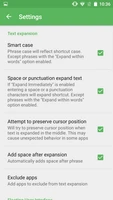


Apps Introduction
For Android users seeking to boost their typing efficiency, Texpand offers a remarkable solution. This Android application provides a convenient way to create shortcuts for frequently used phrases, sentences, or paragraphs. By expanding these shortcuts with just a few taps, Texpand promises to save time and effort, making it invaluable for busy professionals and students alike. The app's capacity to substitute abbreviations with full terms ensures seamless and efficient typing. Texpand stands out as an essential tool for anyone looking to enhance their productivity and eliminate repetitive typing tasks.
Main Features and Functions
Texpand allows users to create shortcuts for common phrases, which expands the saved text automatically as you type. This feature is particularly useful for those who regularly type repetitive phrases or sentences, significantly cutting down on the time spent typing.
- One of Texpand’s standout features is its integration of variables, which enables users to insert dynamic data such as date/time, cursor position, and clipboard contents into their text. This functionality streamlines workflows by automating multi-step actions into a single keystroke.
- Texpand also offers advanced data backup capabilities by securely storing sensitive data on Google Drive, ensuring peace of mind with data management.
- The app's ability to import and export data via CSV files facilitates easy data transfers, allowing users to maintain continuity across different platforms and devices.
User Experience and Interface
Texpand is designed with a user-friendly interface that enhances user interaction and experience. Its recent interface update has made exploring the application's features smoother and more intuitive. The integration of dynamic terminology lists with each shortcut further simplifies user navigation within the app.
Moreover, Texpand provides customization options, such as custom hotkeys and global text expansion capabilities, ensuring that the app adapts to the specific needs of each user. These personalization features contribute to an overall superior typing experience, allowing for efficient task completion.
Practical Applications
Professionals who often deal with repetitive documentation tasks will find Texpand immensely useful. By automating the expansion of predefined text blocks, the app helps in crafting documents faster and with greater accuracy. Students can similarly benefit from Texpand by storing and quickly recalling commonly used academic phrases or entire segments of text.
Additionally, the app's advanced features, such as variable integration, make it ideal for technical users who require precision and flexibility in text insertion, thus broadening its appeal across various application scenarios.
Seamless Functionality and Integration
Texpand’s use of the Assistive API enhances its usability by ensuring smooth integration with other applications. This capability allows seamless detection and expansion of saved shortcuts as you type across different apps, eliminating the need to toggle between applications for text input.
Download and Explore Texpand
If you're an Android user looking to streamline your typing and increase efficiency, Texpand is a must-download. Its well-rounded features cater to a diverse audience—from professionals needing to speed up document creation to students looking for productivity tools. By downloading Texpand, you can experience its expansive and flexible capabilities, which transform repetitive tasks into streamlined workflows. Explore Texpand's advanced features and get ready to elevate your typing efficiency today!
Apps Information
-
Size
34.52M
-
Language
English
-
Developer
Isaias Matewos.
-
Version
v2.0.2
-
Updated
11 26, 2026
-
Package
com.isaiasmatewos.texpand
-
Category
System Tools
Related Topics
More- Best Tools Apps

11 18, 2026Update
Get the best Android utility apps in 2026. Download free tools for file management, phone cleaning, security, system optimization, and everyday productivity.
-
View
 Level SuperMind
Lifestyle Services / 95.67MB
-
View
Texpand
System Tools / 34.52MB
-
View
 Restyle
Photo Enhancement / 17.04MB
-
View
 Root Booster
System Tools / 2.68MB
-
View
 Film Maker Pro
Photo Enhancement / 38.26MB
-
View
 Filmic Pro
Photo Enhancement / 58.96MB
Related News
More


You Might Also Like
Change





Similar Apps
More-
View
Root Booster
2.68M
-
View
 Shizuku
2.48M
-
View
 NetVPN
26.3M
-
View
 Global VPN
47.08M
-
View
 Clean Master
21.72M
-
View
 FullRoid X
74.93M
-
View
 FE File Explorer
98.91M
-
View
 Magisto
26.68M
Featured Topics
More


Popular Apps
More-
View
Level SuperMind
95.67M
-
View
 Amor AI
29.48M
-
View
Texpand
34.52M
-
View
Restyle
17.04M
-
View
Root Booster
2.68M
-
View
 CDisplayEx
14.43M
-
View
Film Maker Pro
38.26M
-
View
Filmic Pro
58.96M
Question
- Download failed
- Outdated Resources
- Resource Error
- Viral Applications
- Pornography
- Gambling
- Political Unrest
- Fraud
- Infringement
- Other
Description
Tel
Report or Correction