

Video MP3 Converter
For Android
Screenshot
Apps Introduction
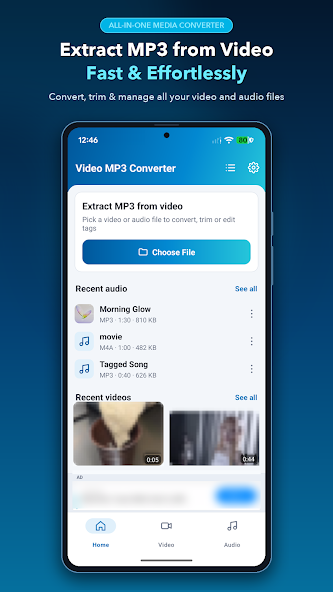
The Video MP3 Converter is a fast and efficient Android application designed to convert and edit media files with ease. Known for its rapid processing speed, this app allows users to seamlessly convert video files to MP3 format, resize files, and create custom ringtones. Users can also modify album covers with this versatile tool. Supported on devices like the Galaxy S7, the app boasts remarkable conversion times compared to similar applications, highlighting its efficiency and practicality. With support for a wide range of video and audio formats, users can expect a reliable media conversion experience.
Efficient Media Conversion
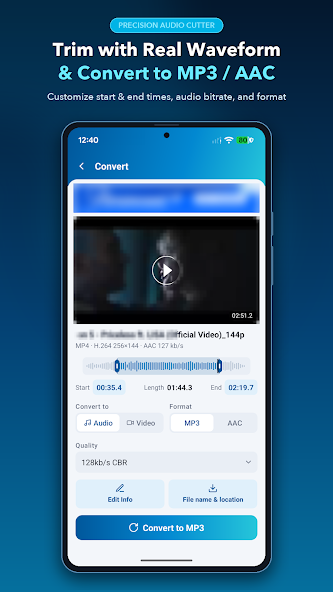
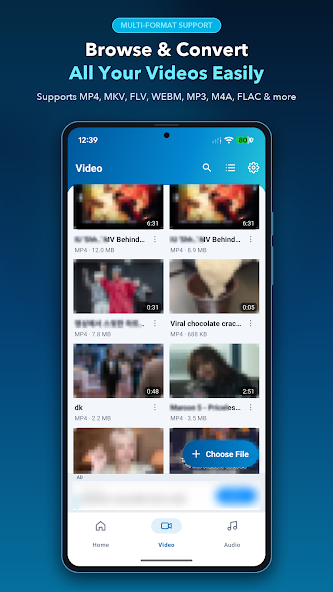
Video MP3 Converter is acclaimed for its standout conversion speed. For instance, converting a 3 minute 50-second song on a Galaxy S7 takes only 14.2 seconds. This quick processing allows users to handle their media files far more efficiently than with other solutions like "A," "B," or "C" converters, which take between 46 and 56 seconds for similar tasks. The app supports various media types, including MP4, 3GP, WEBM, WMV, and FLV for video, as well as MP3, AAC, and OGG for audio.
Customizable Audio Functions
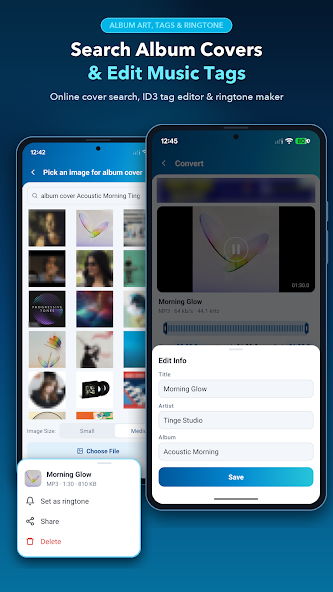
Beyond basic conversion, Video MP3 Converter offers tools to trim audio files and create personalized ringtones, enabling users to tailor their audio experiences. Additionally, the app allows for the editing of MP3 metadata and the customization of music album covers, adding a personal touch to your digital music collection.
Intuitive User Interface
The application features a straightforward and user-friendly interface, making it accessible even for those unfamiliar with media conversion software. The intuitive design ensures that users can easily navigate through the features without needing extensive technical knowledge, making the app suitable for users seeking both simplicity and functionality.
How to Get Started
To start using Video MP3 Converter, users need to download the APK from a trusted source like apkmody. Ensure that the "unknown sources" option is enabled on your device to permit installation. Once the APK is downloaded, simply save the file to your device's download folder, initiate the installation, and begin exploring the app's robust features.
Conclusion: Transform Your Media Experience
Video MP3 Converter stands out as a premier choice for Android users looking to manage and modify their multimedia files efficiently. With its swift conversion speeds and robust feature set, it appeals to those who prioritize efficiency and customization in their digital experiences. For users interested in transforming video files into customizable audio tracks or creating unique ringtones, exploring the details and downloading the app on an Android device could be highly beneficial.
Apps Information
-
Size
13.88M
-
Language
English
-
Developer
FunDevs LLC
-
Version
v2.8.1
-
Updated
11 25, 2026
-
Package
com.fundevs.app.mediaconverter
-
Category
Video & Audio
Related Topics
More- Free Multimedia Apps
- Best Tools Apps

11 18, 2026Update
Download the best multimedia apps for Android in 2026. Find free apps for music streaming, video playback, photo editing, and media management to boost your mobile entertainment.
-
View
Video MP3 Converter
Video & Audio / 13.88MB
-
View
 Le Parisien
News & Reading / 142.06MB
-
View
 GIF Maker
Photo Enhancement / 40.84MB
-
View
 Video Maker Music Video Editor
Video & Audio / 180.68MB
-
View
 Hungama
Entertainment Apps / 9.41MB
-
View
 BIGVU Teleprompter
Video & Audio / 188.05MB

11 18, 2026Update
Get the best Android utility apps in 2026. Download free tools for file management, phone cleaning, security, system optimization, and everyday productivity.
-
View
 Automatic Subtitles & Captions
Video & Audio / 70.21MB
-
View
 Movavi Clips
Video & Audio / 71.43MB
-
View
 Artify
System Tools / 17.86MB
-
View
 MultiTimer
System Tools / 9.84MB
-
View
Video MP3 Converter
Video & Audio / 13.88MB
-
View
 Blend Photos
Theme Wallpapers / 25.36MB
Related News
More


You Might Also Like
Change





Similar Apps
More- View
-
View
Movavi Clips
71.43M
-
View
 Blink Captions by Vozo AI
126.64M
-
View
 Rock Radio
21.59M
-
View
 Vivu Video
53.27M
-
View
Video Maker Music Video Editor
180.68M
-
View
 Music AI
99.04M
-
View
 Tubio
58.29M
Featured Topics
More

Popular Apps
More-
View
 Phrasal Verbs
20.49M
-
View
 Manglish Keyboard
67.36M
- View
-
View
Movavi Clips
71.43M
-
View
Artify
17.86M
-
View
MultiTimer
9.84M
-
View
 Speed Test
22.17M
-
View
Video MP3 Converter
13.88M
Question
- Download failed
- Outdated Resources
- Resource Error
- Viral Applications
- Pornography
- Gambling
- Political Unrest
- Fraud
- Infringement
- Other
Description
Tel
Report or Correction