
MultiTimer
For Android
Screenshot
Apps Introduction
Looking for a versatile time management tool on your Android device? MultiTimer might be just what you need. This Android application offers a comprehensive approach to managing time and tasks, enabling users to create and customize multiple timers for various activities, from cooking and workouts to studying and working. Whether you're aiming to improve productivity or simply keep track of daily events, MultiTimer provides a flexible and user-friendly solution. Its diverse range of features ensures users can manage their time efficiently and effectively, making it a beneficial tool for anyone looking to optimize their schedule.
Key Features of MultiTimer
MultiTimer comes packed with a host of useful features, giving it the edge as a potent time management tool:
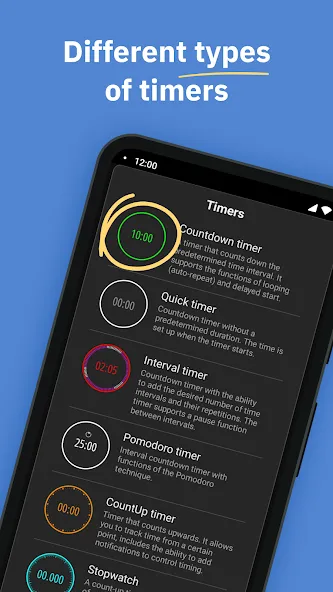
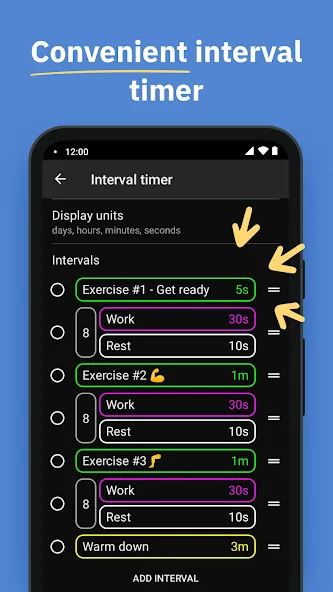
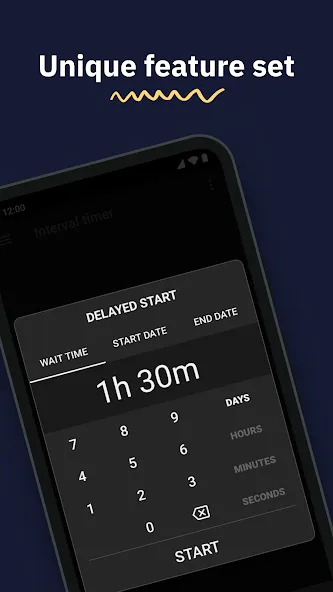
- Universal Timers: Supports a variety of timer styles including Countdown, Quick Start, Count Up, Pomodoro, Interval Timer, Stopwatch, and Clock. This functionality suits any activity you need to track.
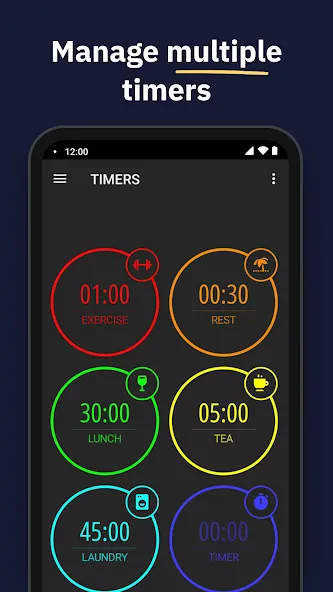
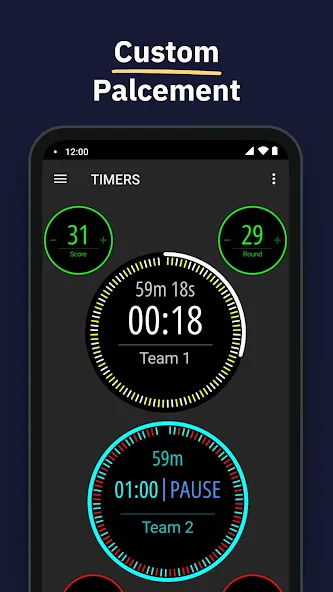
- Flexible Layout: Customize your timer boards with unique layouts, allowing you to manage multiple timers side by side with ease.
- Personalization: Add your personal touch with labels, colors, icons, alert styles, and sounds to your timers and counters.
- Advanced Control: Features like editable timer durations, "Autorepeat," and history tracking enhance user control over timers.
- Interactive Widgets: The home screen widget allows for quick timer access and management.
User Experience and Interface
MultiTimer's interface is designed for adaptability and ease of use. The application offers customizable boards that can be tailored to specific needs, making it simple for users to manage their timers in a way that best fits their personal or professional lifestyle. The clarity and functionality of its layout contribute to an efficient user experience, ensuring that users can focus on their tasks without unnecessary distractions.
Practical Applications and Versatility
Whether at home, in the gym, or at the office, MultiTimer’s versatility means it can be adapted for any situation requiring precise time-tracking. The Pomodoro feature, for instance, is excellent for productivity, splitting work into intervals with breaks to maintain focus. The stopwatch and interval timer functions are ideal for fitness enthusiasts tracking their exercise routines.
Advantages and Unique Characteristics
One of MultiTimer’s significant advantages is its cost-effective functionality. With both free and Pro versions, users can access a wide range of features without financial commitment. Another notable feature is its sharing capability, which lets users send timer links for events or tasks to others, facilitating coordination in team settings or family arrangements.
Embark on Efficient Time Management with MultiTimer
MultiTimer offers Android users an efficient pathway to optimize their time management strategies through a wide array of features and customizable options. This application is ideal for busy professionals, students, or anyone needing structured time management solutions. Available for download, it provides an inviting opportunity for those looking to elevate their productivity levels with intuitive and powerful tools. Get started with MultiTimer today to explore its full potential and enhance your management of time effectively.
Apps Information
-
Size
9.84M
-
Language
English
-
Developer
Persapps
-
Version
v1.15
-
Updated
11 25, 2026
-
Package
com.persapps.multitimer
-
Category
System Tools
Related Topics
More- Best Lifestyle Apps
- Best Tools Apps

11 18, 2026Update
Upgrade your daily routine with the best lifestyle apps for iPhone in 2026. Download free apps for fitness, health tracking, habit building, shopping, and personal planning.
-
View
MultiTimer
System Tools / 9.84MB
-
View
 AI Chat Chat with AI Bot
System Tools / 44.12MB
-
View
 Dr. Kegel
Lifestyle Services / 116.19MB
-
View
 Forma Healthy
Lifestyle Services / 55.7MB
-
View
 Herbs Dictionary
Lifestyle Services / 34.56MB
-
View
 Any do
Photo Enhancement / 81.98MB

11 18, 2026Update
Get the best Android utility apps in 2026. Download free tools for file management, phone cleaning, security, system optimization, and everyday productivity.
-
View
 Automatic Subtitles & Captions
Video & Audio / 70.21MB
-
View
 Movavi Clips
Video & Audio / 71.43MB
-
View
 Artify
System Tools / 17.86MB
-
View
MultiTimer
System Tools / 9.84MB
-
View
 Video MP3 Converter
Video & Audio / 13.88MB
-
View
 Blend Photos
Theme Wallpapers / 25.36MB
Related News
More


You Might Also Like
Change




Similar Apps
More-
View
 Manglish Keyboard
67.36M
-
View
Artify
17.86M
-
View
 Speed Test
22.17M
-
View
 Caynax Hourly Chime
20.92M
-
View
 Notifications archive
10.97M
-
View
 KillApps
23M
-
View
 Activity Launcher
67.21M
-
View
 VMOS PRO
37.12M
Featured Topics
More


Popular Apps
More-
View
 Phrasal Verbs
20.49M
-
View
Manglish Keyboard
67.36M
- View
-
View
Movavi Clips
71.43M
-
View
Artify
17.86M
-
View
MultiTimer
9.84M
-
View
Speed Test
22.17M
-
View
Video MP3 Converter
13.88M
Question
- Download failed
- Outdated Resources
- Resource Error
- Viral Applications
- Pornography
- Gambling
- Political Unrest
- Fraud
- Infringement
- Other
Description
Tel
Report or Correction