

Vivid N.G.
For Android
Screenshot
Apps Introduction
Vivid N.G. is a cutting-edge Android application designed to transform how users interact with their devices through intuitive gesture controls. This application offers a seamless navigation experience by replacing traditional button commands with a variety of customizable gestures. Users can expect an engaging interface with smooth visual effects, enhancing everyday tasks and device management. By incorporating features such as launching apps, toggling settings, and navigating quickly through gesture prompts, Vivid N.G. stands out as a practical tool for enhancing mobile interactions.
Gesture-Based Controls for Enhanced Navigation
"Vivid Navigation Gestures" (Vivid N.G.) is at the forefront of the trend towards gesture controls on Android devices. It enables users to control their devices through simple gestures rather than the traditional button presses. This approach not only modernizes the mobile navigation experience but also makes it accessible without the need for the latest hardware or Android versions.
Customizable Gestures and Triggers
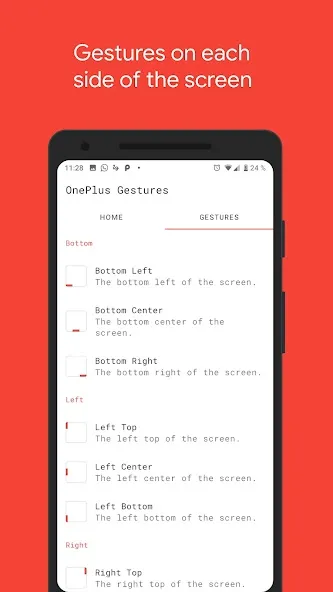
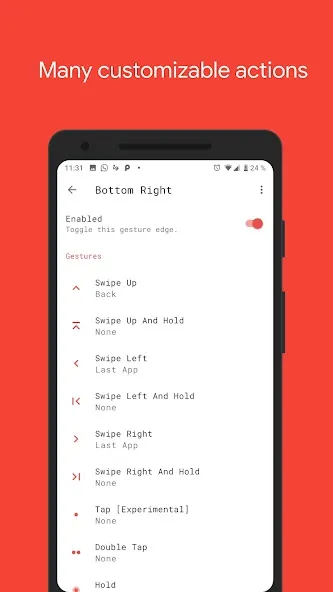
Vivid N.G. allows users to utilize multiple gesture triggers from various screen areas. Available triggers include options like swiping from the bottom corners, the center, or the top edges. Gestures such as swipe up, down, left, right, and tap actions like double-tap or long press can be assigned to different commands. These include launching Google Assistant, accessing the home screen, opening notifications, toggling settings, and controlling media playback. This customization empowers users to tailor their device navigation to their preferences.
Visual Design and User Experience
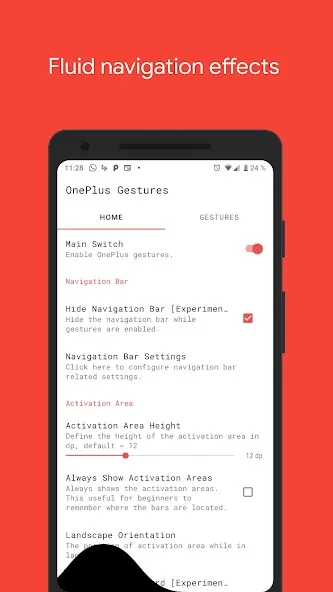
The application is designed with visually appealing effects that accompany gesture execution, offering a smooth and engaging user experience. By allowing users to hide the system navigation bar while using gestures, Vivid N.G. also contributes to a cleaner and more modern interface. These features ensure that navigating through your device feels intuitive and immersive.
Installation and Compatibility Requirements
To fully utilize Vivid N.G., users are required to enable developer mode and USB debugging on their Android device. Advanced features may necessitate ADB or root permissions, which can be set up following straightforward instructions available online. This process requires enabling the "Unknown Sources" option for APK installation, ensuring compatibility across various devices and Android versions.
Seamless Device Control with Vivid N.G.
Vivid N.G. offers a revolutionary approach to mobile device control through its gesture-based system, making it an appealing option for tech enthusiasts and everyday users alike. Its extensive customization capabilities and sleek design allow users to enhance their mobile interaction experience significantly. For those interested in optimizing device navigation and exploring innovative features, more details and download options are available for Android users looking to transform their device control experience.
Apps Information
-
Size
4.95M
-
Language
English
-
Developer
Manuel Wrage
-
Version
v10406
-
Updated
11 27, 2026
-
Package
com.ivianuu.oneplusgestures
-
Category
System Tools
Related News
More


You Might Also Like
Change




Similar Apps
More-
View
 Gemmy AI
91.89M
-
View
 ezPDF Reader
63.64M
- View
-
View
 Vmake
263.6M
-
View
 Virtual Xposed
10.1M
-
View
 DWG FastView
101.03M
-
View
 Douyin
34.81M
-
View
 SuperDisplay
6.48M
Featured Topics
More


Popular Apps
More-
View
 ArtCollage Pro
43.09M
-
View
 OSDE
68.19M
-
View
 Blurrr
236.66M
-
View
 Hydro Coach PRO
14.27M
-
View
Vivid N.G.
4.95M
-
View
Gemmy AI
91.89M
-
View
ezPDF Reader
63.64M
- View
Question
- Download failed
- Outdated Resources
- Resource Error
- Viral Applications
- Pornography
- Gambling
- Political Unrest
- Fraud
- Infringement
- Other
Description
Tel
Report or Correction