

NetGuard
For Android
Screenshot
Apps Introduction
NetGuard is a powerful Android application designed to control internet access for applications and addresses on your device. Its primary purpose is to give users the ability to manage data usage, conserve battery life, and ensure privacy without requiring root access. Characterized by its user-friendly interface and open-source nature, NetGuard offers reliable internet management features. Users can expect efficient network monitoring, robust privacy protection, and customizable control over network activities, making it a practical tool for enhancing digital experiences in the modern age.
Efficient Internet Access Management
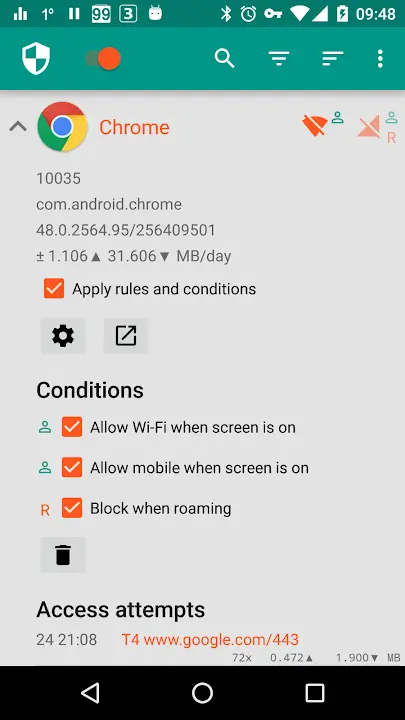
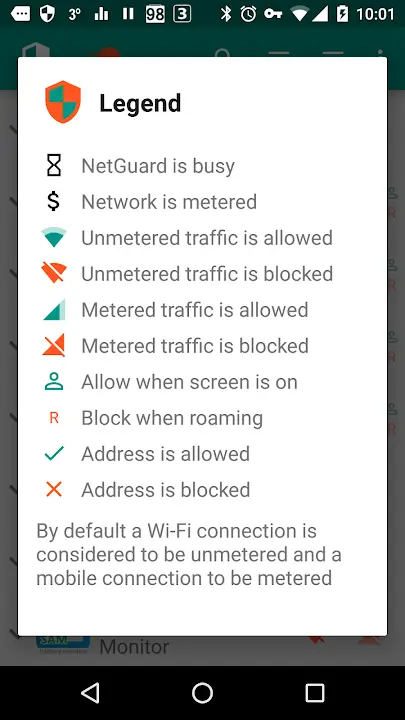
NetGuard allows users to efficiently manage both Wi-Fi and mobile network connections by restricting internet access for specific apps and addresses. This feature is especially useful for conserving data and preventing unwanted charges by disabling internet access for apps during roaming. Additionally, users can customize internet permissions based on the screen status, ensuring optimal data usage as per their needs.
User-Friendly and Open-Source Design
The app stands out with its easy-to-use interface, making it accessible even for non-technical users. Being open-source, NetGuard ensures transparency and allows users to understand its underlying mechanics, bolstering trust in its privacy-centric measures. It also refrains from communicating with external servers, providing robust data privacy protection and a seamless, ad-free user experience.
Broad Compatibility and Versatile Support
NetGuard supports devices running Android 5.1 and higher, extending its compatibility to a wide range of users. It functions with both IPv4 and IPv6 network configurations, and supports TCP and UDP protocols, making it versatile across various network environments. This broad compatibility ensures that most Android users can benefit from its functionalities.
Advanced Features for Enhanced Security
Beyond basic network control, NetGuard offers advanced features such as tracking network usage per application and address. This function helps users in understanding their data consumption trends to make informed decisions about internet usage. Additionally, it supports monitoring outbound traffic, exporting PCAP files for traffic analysis, and allows selective authorization or blocking of app addresses for granular control over network access.
Customizable Thematic Interface
To enhance user experience further, NetGuard incorporates Material Design aesthetics with both light and dark themes. Users can choose from five different themes, ensuring a visually pleasing and balanced interface that suits individual preferences. This adaptability in design caters to a wide array of user aesthetic preferences.
Conclusion of NetGuard's Capabilities
With its robust suite of internet management tools, NetGuard enhances user security awareness and provides easy configuration of network security measures directly from the notification bar. The app is perfect for users seeking to manage their digital activities efficiently, with the added benefit of customizable network settings and extensive compatibility across Android versions. For those interested in superior privacy and network management, NetGuard presents a compelling Android download option to explore further.
Apps Information
-
Size
3.07M
-
Language
English
-
Developer
Marcel Bokhorst, FairCode BV.
-
Version
v2.337
-
Updated
11 24, 2026
-
Package
eu.faircode.netguard
-
Category
System Tools
Related Topics
More- Best Tools Apps

11 18, 2026Update
Get the best Android utility apps in 2026. Download free tools for file management, phone cleaning, security, system optimization, and everyday productivity.
-
View
 Speed Check
System Tools / 7.62MB
-
View
 Apk Editor Pro
Work & Study / 61.92MB
-
View
 Miga Town My TV Shows
Work & Study / 78.06MB
-
View
 AVG Cleaner
System Tools / 70.72MB
-
View
 Forma Healthy
Lifestyle Services / 55.7MB
-
View
 AutoResponder for SGNL
Social Chat / 15.59MB
Related News
More


You Might Also Like
Change





Similar Apps
More-
View
 Wireless Earphones
26.71M
-
View
Speed Check
7.62M
-
View
 Recepciones
41.71M
-
View
AVG Cleaner
70.72M
-
View
 MobiSaver
37.11M
-
View
 Alarm Clock
9.01M
-
View
 Dual Space Pro
45.57M
-
View
 B2C SFA
95.25M
Featured Topics
More


Popular Apps
More-
View
Wireless Earphones
26.71M
-
View
 La Matinale
24.97M
-
View
Speed Check
7.62M
-
View
 MyGirl AI Girlfriend
24.62M
-
View
Apk Editor Pro
61.92M
-
View
 Fandango
35.41M
-
View
Recepciones
41.71M
-
View
Miga Town My TV Shows
78.06M
Question
- Download failed
- Outdated Resources
- Resource Error
- Viral Applications
- Pornography
- Gambling
- Political Unrest
- Fraud
- Infringement
- Other
Description
Tel
Report or Correction