

Xmind
For Android
Screenshot


Apps Introduction
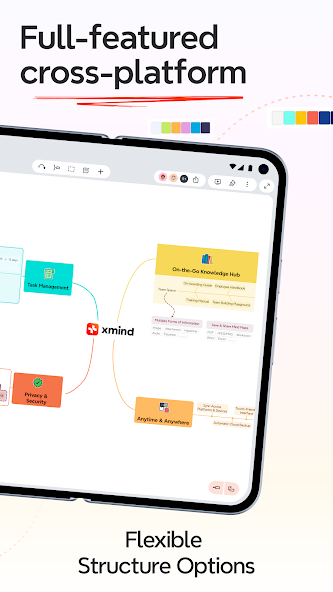
Xmind is a versatile Android application designed to enhance productivity through advanced mind mapping. As a tool that has been consistently innovating for over 19 years, Xmind offers features that aid in smarter thinking and efficient collaboration, making it a staple for both individuals and teams. With standout elements such as real-time collaboration, a plethora of mind mapping structures, and seamless cloud storage, users can expect a comprehensive platform that not only streamlines tasks but also fosters creativity and organization.
Advanced Mind Mapping for Enhanced Productivity
Xmind is renowned for its extensive range of mind mapping tools, offering over 10 specialized structures like Logic Charts, Brace Maps, and Fishbone diagrams. These are designed to help users visually organize and present even the most complex ideas or projects. For those seeking a starting point, the app provides over 100 templates paired with smart color themes, ensuring that mind maps are not only functional but also aesthetically pleasing.
Facilitate Team Collaboration
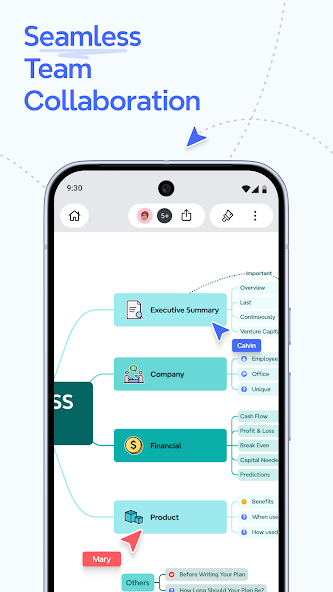
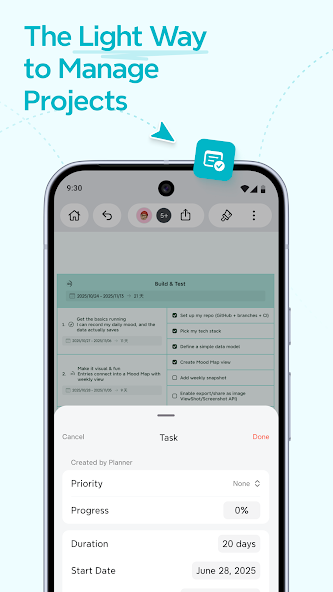
The real-time collaboration capabilities of Xmind set it apart, making it a valuable tool for team-based projects. Users can easily edit and comment on shared maps, which is ideal for brainstorming sessions and project management. Additionally, the app's cloud storage feature ensures that all updates are saved automatically and provide cross-device accessibility, enhancing team productivity while preserving privacy through customized permission controls.
Effortless Content Enrichment and Presentation
Beyond basic mapping, Xmind allows users to enrich their topics with various media types including images, audio notes, and even LaTeX equations. It features a robust search and replace function to streamline map content updates. Moreover, the app offers innovative presentation modes such as Pitch Mode, which automatically generates slideshows based on map content, and ZEN Mode, which provides a distraction-free environment to help users stay focused.
Unleash Creativity with Customization Options
Xmind extends creativity with its array of customization options, including over 400 illustrations and 200 stickers, all designed by professionals to augment map detail and visual appeal. The application also offers a Hand-drawn Style for more playful maps, and Colored Branches that adapt to different themes, further bolstering creative expression.
Subscription Plans and Accessibility
To fully utilize Xmind's premium features, users can subscribe to various plans available on the Google Play Store. These subscriptions are auto-renewable but can be canceled at any time via the user's account settings. With competitive pricing options for both monthly and yearly terms, Xmind caters to different user needs while remaining accessible across multiple platforms.
Explore Xmind Today
Whether you are an individual looking to boost personal productivity or a team aiming to enhance collaborative efforts, Xmind provides a comprehensive suite of tools to meet your needs. With its blend of innovative features, visually engaging templates, and real-time collaborative capabilities, Xmind redefines what a productive Android app can achieve. Explore its functionalities by exploring the Android download information to elevate your productivity journey today.
Apps Information
-
Size
24.22M
-
Language
English
-
Developer
Xmind Ltd.
-
Version
v1.5.6
-
Updated
11 27, 2026
-
Package
net.xmind.doughnut
-
Category
System Tools
Related Topics
More- Best Tools Apps

11 18, 2026Update
Get the best Android utility apps in 2026. Download free tools for file management, phone cleaning, security, system optimization, and everyday productivity.
-
View
Xmind
System Tools / 24.22MB
-
View
 ArtCollage Pro
Photo Enhancement / 43.09MB
-
View
 Blurrr
Video & Audio / 236.66MB
-
View
 Gemmy AI
System Tools / 91.89MB
-
View
 ezPDF Reader
System Tools / 63.64MB
-
View
 Graphing Calculator by Mathlab
Work & Study / 9.62MB
Related News
More


You Might Also Like
Change





Similar Apps
More-
View
 Macrorify
5.77M
-
View
 Vivid N.G.
4.95M
-
View
Gemmy AI
91.89M
-
View
ezPDF Reader
63.64M
- View
-
View
 Vmake
263.6M
-
View
 Virtual Xposed
10.1M
-
View
 DWG FastView
101.03M

Featured Topics
More


Popular Apps
More-
View
Xmind
24.22M
-
View
 FakeGPS Route
2.79M
-
View
Macrorify
5.77M
-
View
ArtCollage Pro
43.09M
-
View
 OSDE
68.19M
-
View
Blurrr
236.66M
-
View
 Hydro Coach PRO
14.27M
-
View
Vivid N.G.
4.95M
Question
- Download failed
- Outdated Resources
- Resource Error
- Viral Applications
- Pornography
- Gambling
- Political Unrest
- Fraud
- Infringement
- Other
Description
Tel
Report or Correction