

MIUI Theme Editor
For Android
Screenshot
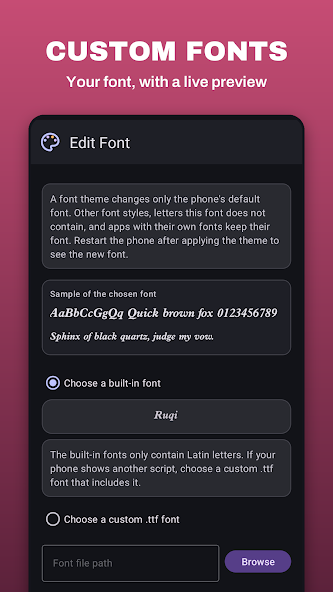
Apps Introduction
Unleash Creativity with MIUI Theme Editor
The MIUI Theme Editor is an innovative Android application designed to empower users to customize and create unique themes for MIUI and HyperOS mobile devices. With its extensive set of tools and features, the MIUI Theme Editor stands out by allowing users to modify wallpapers, icons, status bars, and more, without needing a computer. Users can expect to transform their phone's look using personalized themes that cater to their individual styles, enhancing their overall mobile experience.
Comprehensive Theme Customization
MIUI Theme Editor provides an extensive range of customization options, enabling users to alter various elements of their user interface. These include:
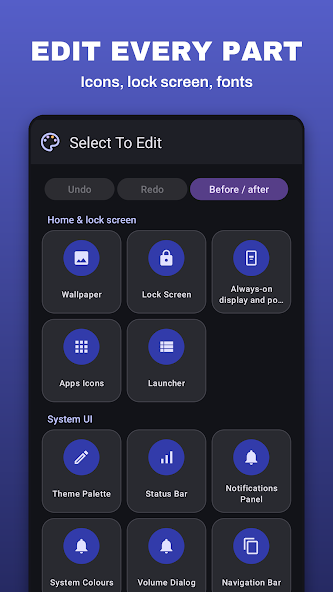
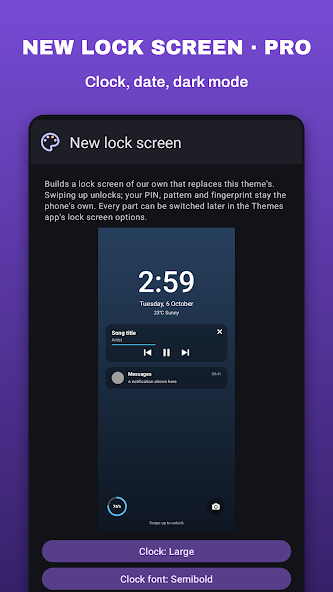
- Wallpapers, lock screens, and Always On Display settings, which support custom images and advanced features like clock and dark mode integration.
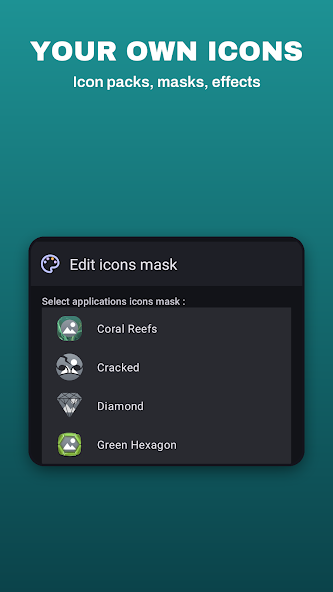
- Icon customizations using installed icon packs, batches, or individual images, complete with masks and effects.
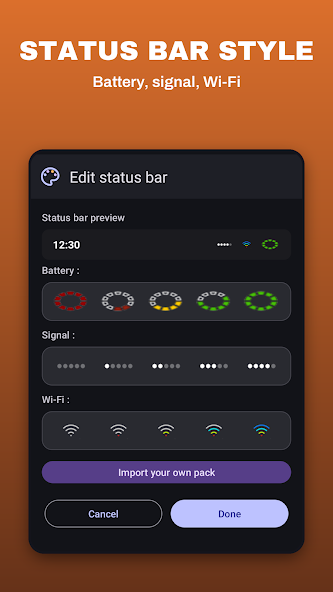
- Adjustments to launcher colors, status bars, notification panels, and navigation bars, allowing for personalized color schemes and icon designs.
- Custom system fonts, sounds, and animation effects to further diversify user experience.
Innovative Editing and User Interface Tools
The app incorporates advanced editing tools such as preset management, undo and redo capabilities, and side-by-side comparison views. Users can also utilize initial templates in light and dark themes, a theme inspector to ensure compatibility, and an advanced MAML code editor for live previews. These features are complemented by a user-friendly interface, designed to facilitate easy navigation and editing.
Professional and Free Editions
While the MIUI Theme Editor is available for free with ads and requires a network connection, users can opt for the professional edition for a one-time purchase. This version removes ads, supports offline use, and unlocks advanced tools like the enhanced editor, new lock screen builder, and additional code editing capabilities. Both versions maintain core editing functionalities, ensuring all users can benefit from the application's capabilities.
How to Get Started with MIUI Theme Editor
Downloading and installing MIUI Theme Editor is straightforward. From platforms like Apkmody, users must enable the "unknown sources" option on their device. Afterward, users can download the APK, save it, and follow the installation prompts. Post-installation, the app serves as a robust tool for ongoing theme personalization, ensuring your device's interface reflects your unique style.
Conclusion and Download Information
MIUI Theme Editor is a powerful application for anyone looking to personalize their MIUI or HyperOS device. With a versatile range of editing tools and the ability to export and share your creations, it offers both creativity and functionality. Whether choosing the free or professional version, users can effortlessly explore its benefits by accessing download options on platforms like Apkmody. Unleash your creativity by downloading the MIUI Theme Editor and transform your mobile device's visual appeal today.
Apps Information
-
Size
138.54M
-
Language
English
-
Developer
MixApplications
-
Version
v3.0.1
-
Updated
11 24, 2026
-
Package
com.mixapplications.miuithemeeditor
-
Category
Theme Wallpapers
Related Topics
More- Wallpaper Free APPS
- Best Tools Apps

11 18, 2026Update
Download the best free wallpaper apps for iPhone in 2026. Find HD wallpapers, live wallpapers, nature scenes, abstract designs, and home screen backgrounds.
-
View
 Smile Launcher
System Tools / 33.97MB
-
View
MIUI Theme Editor
Theme Wallpapers / 138.54MB
-
View
 AI Art Generator
Work & Study / 95.76MB
-
View
 Spheroid
Theme Wallpapers / 128.32MB
-
View
 PixaMotion
Photo Enhancement / 64.79MB
-
View
 UgPhone
System Tools / 130.81MB

11 18, 2026Update
Get the best Android utility apps in 2026. Download free tools for file management, phone cleaning, security, system optimization, and everyday productivity.
-
View
 Speed Check
System Tools / 7.62MB
-
View
 Apk Editor Pro
Work & Study / 61.92MB
-
View
 Miga Town My TV Shows
Work & Study / 78.06MB
-
View
 AVG Cleaner
System Tools / 70.72MB
-
View
 Forma Healthy
Lifestyle Services / 55.7MB
-
View
 AutoResponder for SGNL
Social Chat / 15.59MB
Related News
More


You Might Also Like
Change





Similar Apps
More-
View
 Sticker Maker
20.04M
-
View
Spheroid
128.32M
-
View
 Folder Widget
21.96M
-
View
 Launcher OS
130.01M
-
View
 Facemoji Keyboard
57.92M
-
View
 MagPic - Photo Editor Pro
23.95M
-
View
 Wallfever
7.31M
-
View
 Windy com
45.97M
Featured Topics
More


Popular Apps
More-
View
 Wireless Earphones
26.71M
-
View
 La Matinale
24.97M
-
View
Speed Check
7.62M
-
View
 MyGirl AI Girlfriend
24.62M
-
View
Apk Editor Pro
61.92M
-
View
 Fandango
35.41M
-
View
 Recepciones
41.71M
-
View
Miga Town My TV Shows
78.06M
Question
- Download failed
- Outdated Resources
- Resource Error
- Viral Applications
- Pornography
- Gambling
- Political Unrest
- Fraud
- Infringement
- Other
Description
Tel
Report or Correction